
Introduction
JML (JSON-Inspired DSL-style Markup Language) is a new, lightweight, and efficient markup format developed for Ascoos OS, the first implementation of WebAI (the internet as an intelligent entity), aiming to provide a cleaner, more consistent, and modern alternative to conventional HTML. Based on JSON and DSL principles, JML enables the creation of UI templates in a more structured, secure, and significantly shorter way.
Unlike HTML, which was designed in 1997 for text + multimedia, JML was designed in 2025 for all future formats, with full UTF-8 support, AST parsing, semantic macros, and the ability to run in browsers, editors, and server-side environments.
JML was designed for WebAI as we define it: decentralized, zero-trust, native AI/NLP/IoT, with no external dependencies. It offers clean JSON-inspired syntax, native AST, semantic macros, and XSS-free rendering — ideal for autonomous, predictive, and self-protecting web interfaces.
html {
  head {
    meta:charset('UTF-8')
    link:rel('stylesheet'),href('https://cdn.ascoos.com/bootlib/css/bootlib.min.css')
  }
  body:class('dark-theme') {
    h1{`Welcome to JML!`}
    p{`Lightweight markup for Ascoos OS.`}
  }
}
1. Why Was JML Created?
JML was developed to solve specific problems with HTML:
1.1. Excessive Boilerplate Code
HTML was designed for static pages of the 1990s–2010s. In Web5/WebAI, we need declarative UI without unnecessary noise, so the AI core can focus on intent rather than parsing.
HTML requires <html>, <head>, <body>, meta tags, attributes, etc. JML incorporates all of this into a clean, JSON-styled structure.
1.2. Lack of Syntactic Consistency
HTML has:
JML has uniform syntax for tags, attributes, and content.
1.3. Lack of AST and Semantic Validation
HTML has no native AST.
JML is built from the ground up on an Abstract Syntax Tree, enabling:
1.4. Greater Efficiency
In real-world examples, JML is 16–40% smaller than equivalent HTML. See section 7.
2. What Is JML?
JML is a markup format that:
It is fully UTF-8 native and allows emojis, Greek, multilingual content, and special characters without escaping.
3. What JML Is Not
4. Why JML for WebAI
5. Where It Is Used Today
6. JML Syntax Structure
6.1. Rules
6.2. Tags
To define a tag, only letters, numbers, and the characters underscore (_) and hyphen (-) can be used in tag names (same as HTML).
Tag content must be enclosed in braces { ...tag content... }.
tagName { ... }

p {`Hello World`}
6.3. Attributes
An attribute :attrName('value') starts with a colon, and its value is defined as a string in single quotes.
Multiple attributes must be separated by commas.
tag:attr('value')
tag:class('btn'),id('main')

a:rel('nofollow'),href('https://ascoos.com'){`Link`}
6.4. Content
Text, whether single-line or multi-line/raw content, must be enclosed in backticks `text`.
tag { `Text` }

div:class('container'){`Hello World`}

blockquote {
  `Multiple
  lines
  with backticks.`
}

style {
    `.container {
        max-width: 1200px;
        margin: 0 auto;
        padding: 20px;
        background-color: #f4f4f4;
    }`
}
script {
    `function validateForm() {
        let name = document.getElementById("name").value;
        let email = document.getElementById("email").value;
        if (name === "" || email === "") {
            alert("Please fill out all fields!");
            return false;
        }
        return true;
    }`
}
6.5. Void Tags
Void tags like meta, link, img, etc., cannot contain sub-tags or {}.
br
img:src('image.png'),alt('...')

link:rel('alternate'),hreflang('el'),href('https://os.ascoos.com/index.html')
6.6. Nested Blocks
Any non-void tag can nest other tags inside {...}
html {
  head {
    meta:charset('UTF-8')
    link:rel('stylesheet'),href('https://cdn.ascoos.com/bootlib/css/bootlib.min.css')
  }
  body:class('dark-theme') {
    nav {
      ul {
        li{`Home`}
        li{`About`}
      }
    }
    main {
      h1{`Welcome!`}  // UTF-8 OK
      p{`Content.`}
    }
  }
}
7. JML vs HTML – The Ultimate Comparison (2025)
| Feature | JML | HTML5 |
|---|---|---|
| Page size (minified) | 64 characters (Hello World) | 108 characters |
| With meta + viewport + favicon | 177 characters | 212 characters |
| Average reduction | 16–40% smaller | – |
| Boilerplate | None | DOCTYPE, head, body, closing tags |
| XSS Security | Safe by default (AST validation) | Depends on developer |
| Executable logic | Already supports basic logic & extensible (foreach, count, semantic macros, etc.) | No |
| Can be encrypted | Yes (WIC - Web Image Cryptography standard) | No |
| Live editing | Yes (Ascoos Code Editor) | Yes |
| Native browser support | No (requires official JML Extension) | Yes |
| Tools & ecosystem | New / limited | Huge |
| Learning curve | Moderate–high | Low |
JML is shorter, safer, and more expressive.
7.1 Undeniable Examples
7.1.1 Very Simple Minified HTML
HTML – 108 characters
<!DOCTYPE html><html lang="en"><head><title>Hello JML</title></head><body><h1>Hello World</h1></body></html>Same in JML (minified): 64 characters
html:lang('en'){head{title{`Hello JML`}}body{h1{`Hello World`}}}→ Result: 40.75% smaller
7.1.2 Classic HTML (minified, with meta viewport, charset, favicon): 212 characters
HTML – 212 characters
<!DOCTYPE html><html lang=en><head><meta charset=utf-8><meta name=viewport content="width=device-width,initial-scale=1"><title>Test</title><link rel=icon href=favicon.ico></head><body><h1>Hello</h1></body></html>Same in JML (minified): 177 characters
html:lang('en'){head{meta:charset('utf-8')meta:name('viewport'),content('width=device-width,initial-scale=1')title{`Test`}link:rel('icon'),href('favicon.ico')}body{h1{`Hello`}}}→ Result: 16.51% smaller
8. The AST of JML
JML is not just markup — it is a DSL with AST.
JML → Tokenizer → Parser → AST → Renderer → HTML → Browser
The tokenizer, parser, and renderer of Ascoos OS convert JML into:
This enables:
9. JML Examples
9.1. Full Document Example
JML can describe an entire HTML document:
The result is a complete, functional web page.
<!DOCTYPE html>
<script type="text/jml" id="page-jml">
html:lang('en') {
  head {
    meta:charset('UTF-8')
    meta:name('viewport'),content('width=device-width, initial-scale=1.0')
    title {`Advanced Sample Page`}
    style {
      `.container {
            max-width: 1200px;
            margin: 0 auto;
            padding: 20px;
            background-color: #f4f4f4;
        }
        .header {
            text-align: center;
            color: #333;
            padding: 10px;
            border-bottom: 2px solid #000;
        }
        .form-group {
            margin-bottom: 15px;
        }
        .form-group label {
            display: block;
            font-weight: bold;
        }
        .form-group input, .form-group select {
            width: 100%;
            padding: 8px;
            margin-top: 5px;
        }`
    }
    script {
      `function validateForm() {
            let name = document.getElementById("name").value;
            let email = document.getElementById("email").value;
            if (name === "" || email === "") {
                alert("Please fill out all fields!");
                return false;
            }
            return true;
        }`
    }
  }
  body {
    div:class('container') {
      div:class('header') {
        h1 {`Welcome to Ascoos OS Demo`}
        p {`This is a complex demo with nested elements and interactivity.

        It also supports multi-line text.
        `}
      }
      div:class('content') {
        h2 {`User Registration`}
        form:onsubmit('return validateForm()'),method('POST'),action('/submit') {
          div:class('form-group') {
            label:for('name') {`Name:`}
            input:type('text'),id('name'),name('name'),required('')
          }
          div:class('form-group') {
            label:for('email') {`Email:`}
            input:type('email'),id('email'),name('email'),required('')
          }
          div:class('form-group') {
            label:for('country') {`Country:`}
            select:id('country'),name('country') {
              option:value('us') {`United States`}
              option:value('gr') {`Greece`}
              option:value('de') {`Germany`}
            }
          }
          button:type('submit') {`Submit`}
        }
        br
        div:class('footer') {
          p {`© 2025 Ascoos OS. All rights reserved.`}
          br
          a:href('https://ascoos.com') {`Visit our site`}
        }
      }
    }
  }
}
</script>

<!-- <script src="content-script.js"></script> -->
9.2. Inline Block Example
JML can be embedded within HTML:
<!DOCTYPE html>
<html lang="en">
<head>
    <meta charset="UTF-8">
    <meta name="viewport" content="width=device-width, initial-scale=1.0">
    <title>Advanced Sample Page</title>
    <link rel="stylesheet" href="https://bootlib.ascoos.com/dist/bootlib-1.0.0a4.min.css">
    <link rel="stylesheet" href="https://bootlib.ascoos.com/dist/bootlib-1.0.0a4.ext.min.css">
    <style>
        .container {
            max-width: 1200px;
            margin: 0 auto;
            padding: 20px;
            background-color: #f4f4f4;
        }
        .header {
            text-align: center;
            color: #333;
            padding: 10px;
            border-bottom: 2px solid #000;
        }
        .footer {
            text-align: center;
        }
        .form-group {
            margin-bottom: 15px;
        }

        .form-group label {
            display: block;
            font-weight: bold;
        }
        .form-group input,
        .form-group select {
            width: 100%;
            padding: 8px;
            margin-top: 5px;
        }
    </style>
</head>
<body>
    <div class="container">
        <div class="header">
            <h1>Welcome to Ascoos OS Demo</h1>
            <p>This is a complex demo with nested elements and interactivity.

                It also supports multi-line text.
            </p>
        </div>
        <div class="box">
            <jml>
                style {`.inner {font-size: 1.4em;}`}
                div:class('inner') {
                p:style('color: brown;') {`This example demonstrates dynamic inline loading of JML documents within an HTML block`}
                br
                p {
                    `test BR`
                    br
                    `OK`
                }
                }
            </jml>
        </div>
        <div class="content">
            <h2>User Registration</h2>
            <form onsubmit="return validateForm()" method="POST" action="/submit">
                <div class="form-group"><label for="name">Name:</label><input type="text" id="name" name="name" required=""></div>
                <div class="form-group"><label for="email">Email:</label><input type="email" id="email" name="email" required=""></div>
                <div class="form-group"><label for="country">Country:</label><select id="country" name="country">
                        <option value="us">United States</option>
                        <option value="gr">Greece</option>
                        <option value="de">Germany</option>
                    </select>
                </div>
                <button class="blib-btn-primary blib-text-lg" type="submit">Submit</button>
            </form><br>
            <div class="footer">
                <p>© 2025 Ascoos OS. All rights reserved.</p><br><a href="https://ascoos.com">Visit our site</a>
            </div>
        </div>
    </div>

    <!-- <script src="content-script.js"></script> -->
</body>
</html>
The browser extension or JML renderer converts it to HTML.
10. The JML Ecosystem
JML comes with a complete toolset:
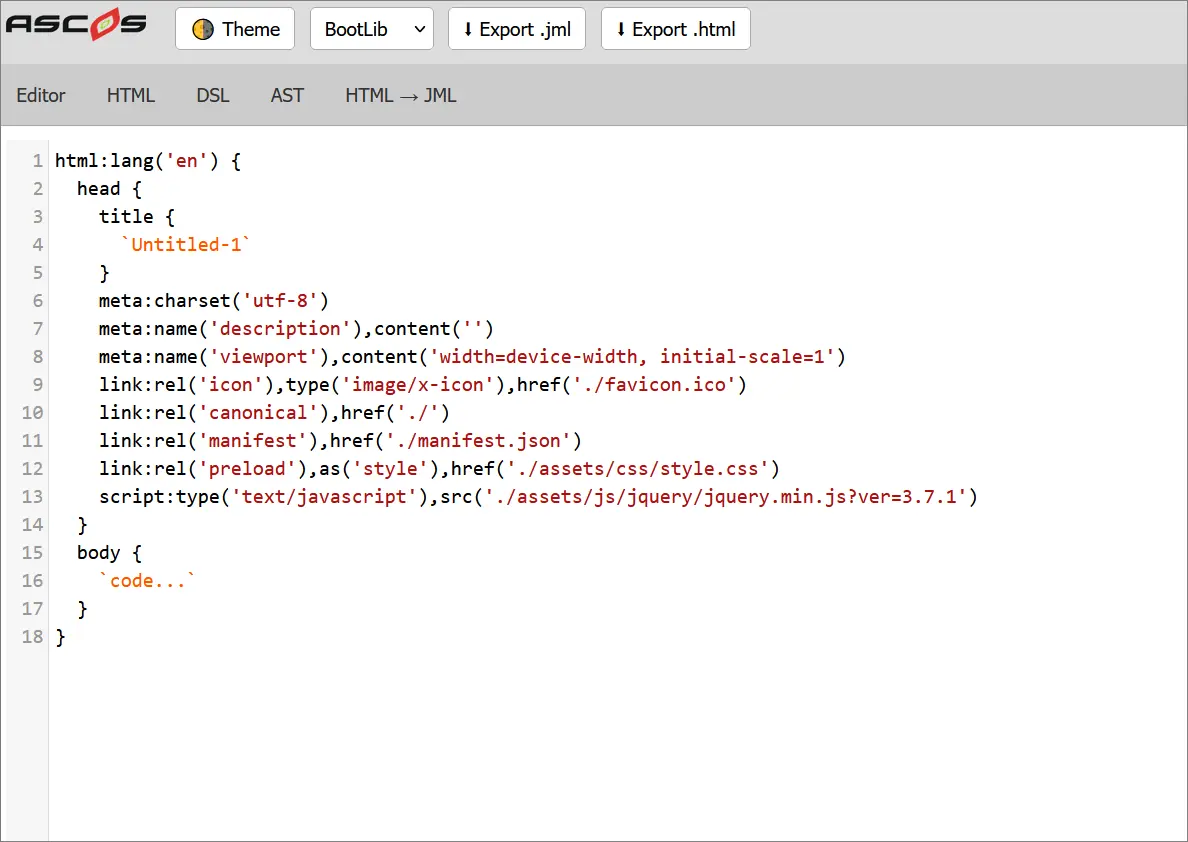
10.1. JML Studio
10.2. Ascoos Kernel Classes
10.3. Semantic Macros
They enable advanced UI generation in Ascoos OS.
11. Browser Extensions (Chrome, Edge, Firefox)
The official Ascoos OS extensions enable:
Supported:
The extension detects:
and converts them to HTML.
12. JML ↔ HTML Conversions
JML can:
This makes it ideal for:
13. Roadmap
14. Try It or Learn More About JML
15. Conclusion
JML is not just a new markup language.
It is a modern, secure, consistent, and extensible foundation for the Web5 and WebAI ecosystem of Ascoos OS, where the web is no longer a tool but a unified, autonomous intelligence.
Through Ascoos OS, the path opens for UIs that learn, predict, and self-protect — the markup of 2030 — available today.
It offers:
It represents the next step in the evolution of markup and paves the way for smarter, safer, and more expressive web applications.
Written by Christos Drogidis — Developer, thinker, and advocate of logically guided software design.